Trying to register a new SDS011 sensor but it is already registered

Hello I am trying to register a new sensor as far as I understand I get the sensor this way:

Then I tried with this recommendation by GPT:

response = b'\xaa\xc0\x86\x01\x16\x03\x71\x77\x88\xab'

# Extract the device ID bytes
device_id_bytes = response[6:8]

# Convert to hexadecimal
device_id_hex = device_id_bytes.hex().upper()
print(f"Device ID (Hex): {device_id_hex}")

# Convert to decimal
device_id_decimal = int.from_bytes(device_id_bytes, byteorder='big')
print(f"Device ID (Decimal): {device_id_decimal}")

and got a matching HEX from the ID of the sticker on the part but I still get:

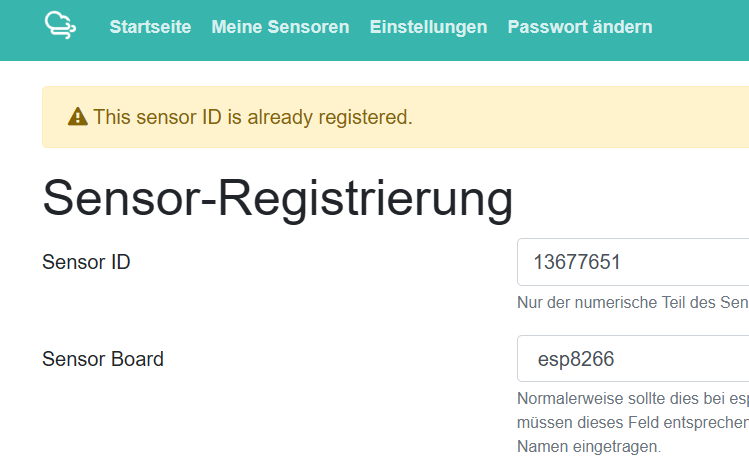
" This sensor ID is already registered."

This is the ID in HEX and Decimal that I get:

root@raspberrypi:/home/ubuntu/pm2-sensor# python3 test.py
Device ID (Hex): 7177
Device ID (Decimal): 29047

Please let me know if this is the ID or I am doing something wrong.

We don’t need the id of the SDS011. What system do you want to use, esp8266 or raspberry or esp32?

I have a raspberry with the SDS011 sensor

Then you should use the serial of the raspberry cpu. This is normally listed in /proc/cpuinfo .

Thank you! Sensor registered and will write up the integration to send some “clean” data :smiley:

Hallo Zusammen, ich habe ein Sensor Community" Sensor.community KIT (SDS011/BME280)" gekauft. Ich habe Sensor angeschlossen. Alles funktioniert bis Sensor registieren möchte. Sensoren senden die Daten zu Web, aber ich kann sensor nicht registrieren, weil schon regiostriet als warnung steht. Wie kann ich dieses problem umgehen?
Sensor ID:
esp8266-13677651

Viele GrĂĽĂźe

Hi @ArchData I’ve released the chipID.

Hello! I tried to register my sensor, but it was not visible on the map. Than I tried to register again, but the system writes the id is alredy registered.
What should I do?
Thank
Agnes
Sensor Id 5594093

@pekagnes I’ve restored the device registration.

Hello @ ricki-z, I have the same issue with the sensor id: 4890898

I’ve deleted my sensor from the system because of the wrong configuration. I want to register it again and now I getting an error: This sensor ID is already registered.

Can you help me please?

Why deleting when one has just to change the configuration ? I will never understand…

Hi, I tried to change the configuration ( working via mobile phone ) but I was missing the functionality to add sensor and change type of NODE… I decided to delete configuration and add it again. I’m wondering that delete works but it keep the NODE id in the database… It’s bug? Can somebody restore my id? I want to connect a new sensor into the community and it’s blocking issue for me…

@ricki-z will do soon.

@jgerek There was a warning as you deleted the registration that you won’t be able to register the chipID again …
We may need some of the information in the registration some days after deletion (i.e. saving data to our archive). So we can’t delete it completely directly.

1 Like

I understand. Thanks a lot for help.

A friend of mine (Guido Van Lierde) has had a PM sensor since mid 2018, at which time the registration was done by Luftdaten directly… No portal existed for registration before mid 2019 (I know, I was there when it became available…) Since then, Guido never had access to his registration data, nor the need to modify this data.

Now his sensor has been renewed by me, using the old (a bit corroded) ESP8266, just to keep his CHIP-id and API id’s, and to keep his old data in line with the new data. All the other components are brand new, and a BME280 replaced the old DHT22, so correction of the registration data is necessary.

Can you give me access to Guido’s registration data on my account (Rik Drabs) on the portal?
(In practice: Adding his sensor to my list of sensors)
Guido’s sensor has CHIP-id 13723281 and API-id’s 13895 & 13896.
The API-id’s should remain the same!!

The renewed sensor of Guido will be one of 200 mostly new sensors I’m installing in Dilbeek, Belgium, in a local clean air project. This network will be active and measuring during school year 2025/2026, and will also be measuring air quality in the 20 local schools, with a local display (my own design) showing real-time results to students and parents.

I published the firmware source of this display on Github in the beginning of this year. Thanks to all folks at sensor.community and to P.J. who showed me the idea with his PM Clock, for the display’s web interface code, which was derived from the web interface code of the PM sensor, with the same “look and feel”.
A better user manual of the display’s hardware and firmware is in the making.

For the PM measuring network we have chosen the SDS011 and BME280 sensors, instead of the old combination SDS011 and DHT22, so Guido’s renewed sensor needs reconfiguration on the portal. In the schools we also use the SEN55 sensor, together with two SDS011 sensors, of which one is temperature compensated to lower the relative humidity, so measurements can be more accurate.

1 Like

Hi @Rik_Drabs I’ve moved the registration to your account.

Thanks for the transfer of Chip-ID 13723281 to my account.
I changed the type of temp/humidity sensor on the portal from DHT22 to BME280, but to no avail.
No temp/humidity measurements are visible on the data tab of the portal since the change yesterday, nor on Grafana, nor via the API.
I remember to have changed the sensor config on the sensor itself from DHT22 to BME280, so what could be the reason for not receiving temp/humidity data, while still receiving PM data?

Humidity data is important for me, as it permits the correction of the PM data in high humidity conditions with a correction factor determined with a humidity compensated SDS011 sensor.
Thanks for the good work there !!!

Are you sure your changes were validated (sensor restarted well) ?
You can check on the interface.

Can you read the logsof the sensor on a PC ?

There is a page with the last measured values directly on the device. Can you see any values there?