I had operated a particulate matter sensor (SDS011+ BME280) for 5 years and it worked well.
Now I moved to a different flat in the same city and want to put it into operation again at the new site. Connected with the power supply, the fan runs periodically and the blue LED is on. However, I get no WIFI signal, even after waiting for a longer time. I flashed the firmware (Windows 10: https://firmware.sensor.community/airrohr/flashing-tool/airRohr-firmware-flasher-0.3.2-Windows_amd64.exe ) but still no WIFI. What could I do?
Thanks for any helpful clue.
If the fan runs periodically, it means new WiFi is well set up.
Have you updated the adress in devices.sensor.community ?
Has the Wifi the Same credentials as before ?
If not the sensor’s own WiFi should appear for 5 minutes.
I don’t receive any WIFI signal although the device is placed close to my WIFI router.
I’m not sure what you mean with not receiving any WIFI signal but I’ll assume that it means that the sensor won’t connect to your local Wifi-network.
If, after a restart or powerup the device can’t connect to a previously or not yet configured Wifi-network it will switch to AP mode. If that happens you should see a Wifi-network called airrohr-6229057 or similar for 10 minutes. During those 10 minutes you can connect to the airrohr-6229057 network (when asked for a password use airrohrcfg). You should then be able to (re)configure the sensor including the connection to the available Wifi-networks on your location. See also the instructions at Sensor Community
Note that after the 10 minutes AP-mode the sensor will go to ‘client’-mode again and will start doing the periodic measurements, even if it can’t connect to the configured Wifi-network. So even without working Wifi the fan will run every 145 seconds and the sensor will try but fail to upload data (blue led flashing).
I expected to see a WIFI signal such as airrohr-xxxxxxx but that did not happen. Not within a 10 min period of time after startup nor later.
I suspect a defect of the WIFI unit. Therefore, I ordered a new ESP8266. Perhaps this will help.
Perhaps you already did that but you could also try to flash the firmware again with the option Erase flash.
Meanwhile, after trying very often, I succeeded in connecting my sensor to my wifi. I have a stable connection withairrohr-6229057 and I can recall actual data over my local wifi.However, my data are not displayed in Grafana/madavi, not in openSense Map (only in grey without data), not in https://maps.sensor.community, nowhere in the web. What could I do?
Could you post a screenshot of the Device Status / Gerätestatus page of the sensor?
Meanwhile I got further. I figured out that I had put in the chipID instead of the senseBox ID. With the correct senseBox ID my data are displayed on openSenseMap openSenseMap.org , but still not on https://maps.sensor.community or Grafana.
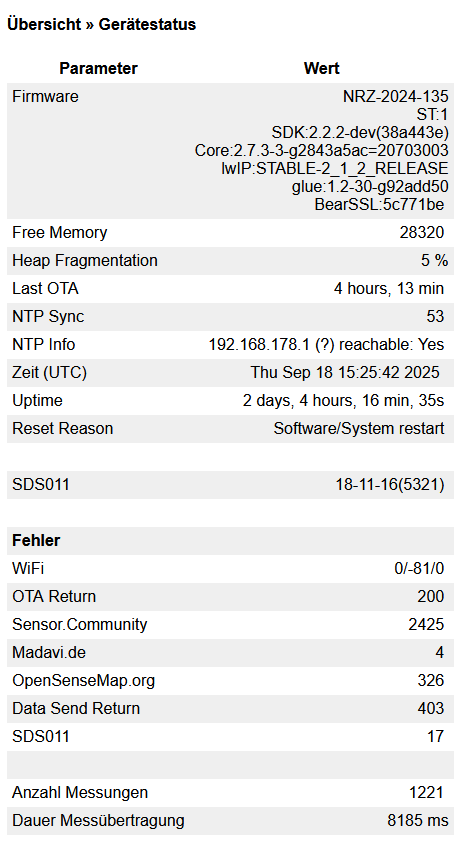
Thanks. This shows that all data uploads to sensor.community failed with a 403 forbidden error. That suggests the sensor isn’t registered. For madavi there are only 4 errors so uploads should be fine. However they are not in the grafana stats for chipid 6229057.
You mentioned that you ordered a new esp8266. Is this new one the device you are using now? If so, the chipid will be different.
Indeed I use the new esp8266. From the Debug page I could see a chipId: 3692839. With this chipId I can see my data on madavi. Thanks a lot for your support!
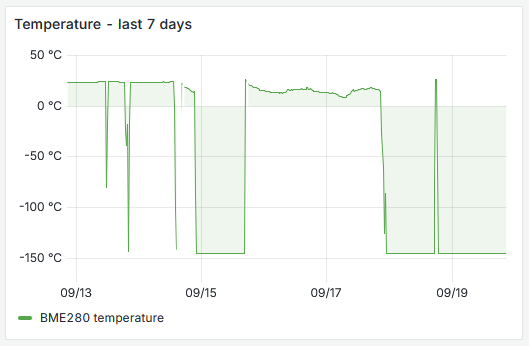
However, the BME280 delivers spurious values. Yesterday I saw sometimes plausible temperatures, today such as -145°C. I had even soldered the connections since I feared loose contacts. Any idea?
Good to hear. For sensor.community uploads you’ll have to add this new chipid to your sensors at devices.sensor.community.
The spurious values of the BME280 (note that also the pressure is very low and humidity will be fixed at 100%) are usually caused by loose/corroded contacts or, and that might be the case here, a weak or unstable power supply. Try changing the power supply.
Hi again!
In my local WIFI, I can see the PM2.5 and PM10 values, but no temperature, pressure, and humidity. I used a 9 V power supply over a long (some 20 m) wire. Directly at the esp8266 there is an LM2596S voltage regulator to ensure 5 V. If this might still be too low, I changed the 9 V power supply to 12 V (i.e. nominally 12 V, effective 16.5 V). But the problem with the BME280 is still present.
On openSenseMap.org my sensor is visible and I can see the values as well as on Grafana. However, on Map Sensor.Community I see only a hexagon without values.
You should get the value of the selected layer when you click on the hexagon. Then if you click on the sensor-id you should get graphs of the values.
I only have experience with ‘simple’ USB-chargers over at most 6 meters cable and without extra electronics so I can’t help you with this one. Perhaps some other forum members with more hardware knowledge might have suggestions.
If you search for “BME280” in the forum, you find many contributions on problems with the BME280.
Thank you for all helpful comments.My sensors are running now. However, the humidity values are rather doubtful. I measured the humidity with two other hygrometers showing values of 62% and 66%, whereas the BME280 provides 86%. Obviously only estimated numbers.
Most likely the BME280 has become saturated. You could try to recondition the BME280. See Ist mein Sensor kaputt? - #3 by v4Lo . Also note my answer there, reconditioning may help for a while but replacing with a new one might be just as easy.