# Install flashing tool on macbook pro
**URL:** https://forum.sensor.community/t/install-flashing-tool-on-macbook-pro/1981
**Category:** Uncategorized
**Created:** [April 4, 2023, 7:40pm UTC](https://forum.sensor.community/t/install-flashing-tool-on-macbook-pro/1981 "2023-04-04T19:40:59Z")
**Posts on this page:** 5
**Page:** 1
### Author:  [@RoeldHond](https://forum.sensor.community/u/RoeldHond)
#### Post date: [April 4, 2023, 7:40pm UTC](https://forum.sensor.community/t/install-flashing-tool-on-macbook-pro/1981/1 "2023-04-04T19:40:59Z")
Hallo
I’m not able to install the flashing tool on my macbook getting the following
**Sensor.Community Airrohr Flasher kan niet worden geopend omdat de ontwikkelaar niet kan worden geverifieerd.**
Dit onderdeel staat op de schijfkopie ‘airRohr-firmware-flasher-0.3.4-MacOS\_BETA.dmg’. Chrome heeft deze schijfkopie vandaag om 21:11 gedownload van **firmware.sensor.community**.
any ideas how to install it
---
### Author:  [@ricki-z](https://forum.sensor.community/u/ricki-z)
#### Post date: [April 5, 2023, 12:19am UTC](https://forum.sensor.community/t/install-flashing-tool-on-macbook-pro/1981/2 "2023-04-05T00:19:58Z")
COuld you please give us the MacOS version you’ve installed (and if possible an english translation of the error messages)?
---
### Author:  [@pjg](https://forum.sensor.community/u/pjg)
#### Post date: [April 5, 2023, 4:35am UTC](https://forum.sensor.community/t/install-flashing-tool-on-macbook-pro/1981/3 "2023-04-05T04:35:08Z")
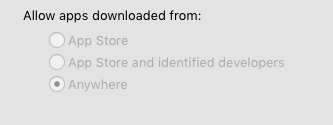
You will have to trust us !
> **[How to Allow Apps from Anywhere in macOS Gatekeeper (Monterey, Big Sur,...](https://osxdaily.com/2016/09/27/allow-apps-from-anywhere-macos-gatekeeper/)**
>
> Gatekeeper in MacOS is now stricter than ever, defaulting to only allow options for apps downloaded from either the App Store or the App Store and identified developers. Advanced Mac users may wish…
---
### Author:  [@RoeldHond](https://forum.sensor.community/u/RoeldHond)
#### Post date: [April 11, 2023, 1:53pm UTC](https://forum.sensor.community/t/install-flashing-tool-on-macbook-pro/1981/4 "2023-04-11T13:53:19Z")
> [@RoeldHond](#):
>
> **Community Airrohr Flasher kan niet worden geopend omdat de ontwikkelaar niet kan worden geverifieerd.**
> Dit onderdeel staat op de schijfkopie ‘airRohr-firmware-flasher-0.3.4-MacOS\_BETA.dmg’. Chrome heeft deze schijfkopie vandaag om 21:11 gedownload van **firmware.sensor.community**.
in Englisch
Community Airrohr Flasher cannot be opened because the developer cannot be verified.
This part is located on the disk image “airRohr-firmware-flasher-0.3.4-MacOS\_BETA.dmg”. Chrome downloaded this image from firmware.sensor.community at 9:11 PM today.
using
mac OS Catalina 10.15.7
---
### Author:  [@pjg](https://forum.sensor.community/u/pjg)
#### Post date: [April 11, 2023, 2:12pm UTC](https://forum.sensor.community/t/install-flashing-tool-on-macbook-pro/1981/5 "2023-04-11T14:12:46Z")
Hi,
Yes, open source is also a question of trust.
You have to configure as “accept from every source”.
```auto
sudo spctl --master-disable
```
> **[How to Allow Apps from Anywhere in macOS Gatekeeper (Monterey, Big Sur,...](https://osxdaily.com/2016/09/27/allow-apps-from-anywhere-macos-gatekeeper/)**
>
> Gatekeeper in MacOS is now stricter than ever, defaulting to only allow options for apps downloaded from either the App Store or the App Store and identified developers. Advanced Mac users may wish…