# How to make the custom api work
**URL:** https://forum.sensor.community/t/how-to-make-the-custom-api-work/3151
**Category:** FAQ
**Created:** [November 19, 2024, 12:12pm UTC](https://forum.sensor.community/t/how-to-make-the-custom-api-work/3151 "2024-11-19T12:12:18Z")
**Posts on this page:** 6
**Page:** 1
### Author:  [@ruitergeo](https://forum.sensor.community/u/ruitergeo)
#### Post date: [November 19, 2024, 12:12pm UTC](https://forum.sensor.community/t/how-to-make-the-custom-api-work/3151/1 "2024-11-19T12:12:18Z")
Hello everybody,
Last week I installed the sensors in my garden and published the data on the different portals. To learn some more I have been trying to configure a custom api. I used the simple data php file:
(data\_simple.php from github)
I copied this page on my own website: [https://ruitergeo.nl/sensoren/sensorapi.php](https://ruitergeo.nl/sensoren/sensorapi.php). In the configuration of the sensor I filled in the location of the page see:
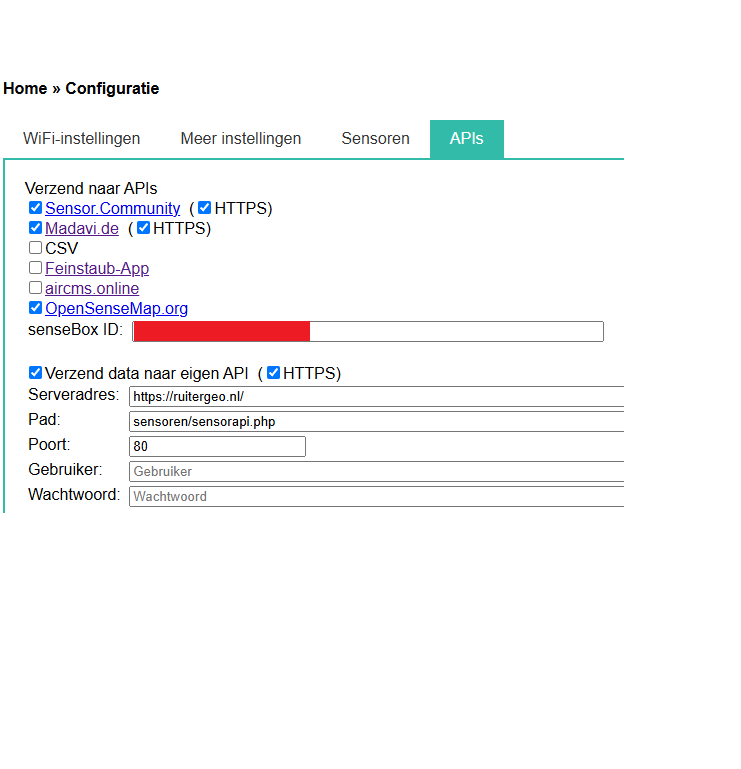
This didn’t work out fine because the logger produces errors:
\*## Sending to custom api: \*
_Request failed with error: -1_
_Time for Sending (ms): 15461_
What did I do wrong?
Can anybody help me with this?
---
### Author:  [@pjg](https://forum.sensor.community/u/pjg)
#### Post date: [November 21, 2024, 6:17am UTC](https://forum.sensor.community/t/how-to-make-the-custom-api-work/3151/2 "2024-11-21T06:17:04Z")
Welcome !
Can you firstly try without the https ?
Then try to remove the .php extension.
Then remove the / or try to put it on the Pad line.
I can remember there are such kind of kleinigkeiten…
---
### Author:  [@pjg](https://forum.sensor.community/u/pjg)
#### Post date: [November 21, 2024, 6:20am UTC](https://forum.sensor.community/t/how-to-make-the-custom-api-work/3151/3 "2024-11-21T06:20:15Z")
And what happens if you try to post with POSTMAN for example. Does it works ?
Check structure here:
> [@Failing to post data to Madavi](https://forum.sensor.community/t/failing-to-post-data-to-madavi/1759/3):
>
> I have read that Wiki more than 10 times but not finding the answer I am looking for. Below the json, reply from Madavi is 200 +(Sensor: esp8266-xxxxxxx ok) so should be ok, but actually no data visible in their Figs. (using Postman for testing). (X-Pin: … not required for Madavi, but I have tried with 0 or 1 but doesn’t work. Not needed to put values between “”). Headers: Content-Type: application/json X-Sensor: esp-xxxxxxx Body: { “software\_version”: “test”, “sensordatavalues”: [ {“…
---
### Author:  [@ruitergeo](https://forum.sensor.community/u/ruitergeo)
#### Post date: [November 21, 2024, 10:11am UTC](https://forum.sensor.community/t/how-to-make-the-custom-api-work/3151/4 "2024-11-21T10:11:15Z")
Hi pjg!
Thanks for your suggestions. I tried all combinations of server and path but did didn’t work out.
I also tried some efforts with postman. For instance:
[https://ruitergeo.nl/sensoren/sensorapi.php?temperature=“2”&humidity=“3”&BME280\_temperature=“1000”&BME280\_humidity=“79”&BME280\_pressure=“999”&Sensor=“esp8266-15109343”&HTTPS\_SENSOR=“esp8266-15109343”](https://ruitergeo.nl/sensoren/sensorapi.php?temperature=%222%22&humidity=%223%22&BME280_temperature=%221000%22&BME280_humidity=%2279%22&BME280_pressure=%22999%22&Sensor=%22esp8266-15109343%22&HTTPS_SENSOR=%22esp8266-15109343%22)
But the php file doesnot understand the parameters. I have little experience with this environment and hoped that somebody else had a working example.
Do you have another idea?
---
### Author:  [@Phaze-III](https://forum.sensor.community/u/Phaze-III)
#### Post date: [November 21, 2024, 1:37pm UTC](https://forum.sensor.community/t/how-to-make-the-custom-api-work/3151/5 "2024-11-21T13:37:13Z")
Hi. Could you try the following in the API-setup:
Serveradres: ruitergeo.nl
Pad: /sensoren/sensorapi.php
Poort: 443
The leading / in Pad is needed and if you want to use HTTPS the port should be set to 443
---
### Author:  [@ruitergeo](https://forum.sensor.community/u/ruitergeo)
#### Post date: [November 21, 2024, 2:13pm UTC](https://forum.sensor.community/t/how-to-make-the-custom-api-work/3151/6 "2024-11-21T14:13:24Z")
Hi!
That did the job!
This was the last logging:
## Sending to custom api:
Succeeded - ruitergeo.nl
Time for Sending (ms): 2979
Thanks for helping me out!