# Export / Download all sensor data
**URL:** https://forum.sensor.community/t/export-download-all-sensor-data/8436
**Category:** FAQ
**Created:** [September 19, 2026, 11:14am UTC](https://forum.sensor.community/t/export-download-all-sensor-data/8436 "2026-09-19T11:14:56Z")
**Posts on this page:** 4
**Page:** 1
### Author:  [@Hans](https://forum.sensor.community/u/Hans)
#### Post date: [September 19, 2026, 11:14am UTC](https://forum.sensor.community/t/export-download-all-sensor-data/8436/1 "2026-09-19T11:14:56Z")
Hi everyone,
I recently moved but wanted to leave a copy and a plot of the air quality of my previous apartment at the Wiki of my previous house. However I cannot figure out how to download the raw data. This is the madavi link: [https://api-rrd.madavi.de:3000/grafana/d/GUaL5aZMz/pm-sensors?var-chipID=esp8266-7783011&from=now-6h&to=now&timezone=browser&var-type=BME280&var-query0=sensors](https://api-rrd.madavi.de:3000/grafana/d/GUaL5aZMz/pm-sensors?var-chipID=esp8266-7783011&from=now-6h&to=now&timezone=browser&var-type=BME280&var-query0=sensors)
I already sent an email to the sensor.community support, but got no answer. Has anyone achieved this? I would probably use Matlab for plotting. Any ideas on where to host this data for the Wiki as well?
Best regards
Hans
EDIT:
I have seen this: [https://archive.sensor.community/](https://archive.sensor.community/) but I don’t want to download 365 individual files. Is there no way to aggregate this info?
---
### Author:  [@Phaze-III](https://forum.sensor.community/u/Phaze-III)
#### Post date: [September 19, 2026, 11:42am UTC](https://forum.sensor.community/t/export-download-all-sensor-data/8436/2 "2026-09-19T11:42:34Z")
Hi. You can download the monthly zipfiles for your sensor at [https://api-rrd.madavi.de/csvfiles.php?sensor=esp8266-7783011](https://api-rrd.madavi.de/csvfiles.php?sensor=esp8266-7783011)
---
### Author:  [@Hans](https://forum.sensor.community/u/Hans)
#### Post date: [September 21, 2026, 9:34am UTC](https://forum.sensor.community/t/export-download-all-sensor-data/8436/3 "2026-09-21T09:34:44Z")
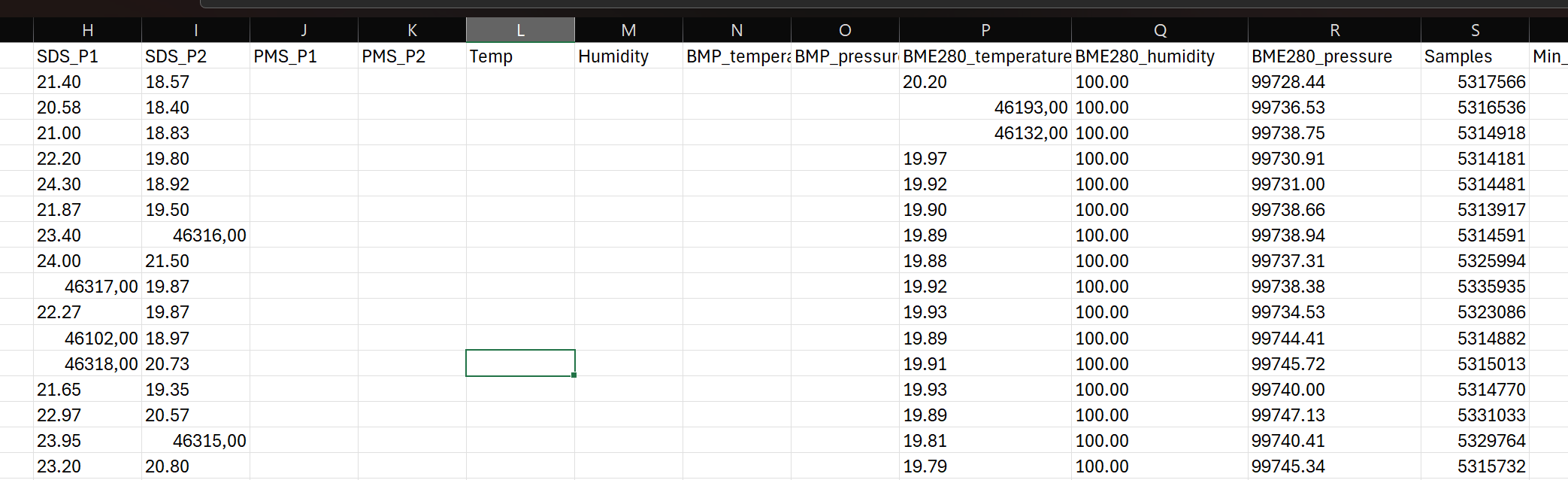
Thanks for the info! I got the files, but I am unsure about the data columns. Is there an explanation somewhere?
What is SDS\_P1 and SDS\_P2? Why do i sometimes have values such as 46000 for them? I believe that is Excel misinterpreting the delimiter, right? What is samples, Min and Max\_cycle?
---
### Author:  [@Phaze-III](https://forum.sensor.community/u/Phaze-III)
#### Post date: [September 21, 2026, 10:55am UTC](https://forum.sensor.community/t/export-download-all-sensor-data/8436/4 "2026-09-21T10:55:23Z")
There is a slightly outdated but for your sensor still accurate description at [EN data format description · opendata-stuttgart/meta Wiki · GitHub](https://github.com/opendata-stuttgart/meta/wiki/EN-data-format-description) . From that document:
- **SDS\_P1** : PM10
- **SDS\_P2** : PM2.5
- **temperature** : Temperature from DHT22
- **humidity** : Humidity from DHT22
- **BME280\_temperature** : Temperature from BME280
- **BME280\_humidity** : Humidity from BME280
- **BME280\_pressure** : Barometric pressure from BME280 in Pascal 
- **samples** : Number of samples gathered in one iteration
- **min\_micro** : minimal time for one iteration in microseconds
- **max\_micro** : maximal time for one iteration in microseconds
- **signal** : RSSI value in dBa (Received Signal Strength Indicator i.e. Wi-Fi strength)
Samples, Min and Max micro are firmware statistics that can help with debugging.
It indeed looks like Excel did some mangling of the original data. Note that the CSV-files have a semicolon ‘;’ as field separator and a period ‘.’ as decimal separator. It looks like Excel in your case expects a comma ‘,’ as decimal separator.