# Configure the station with WiFi network "FaryLink"
**URL:** https://forum.sensor.community/t/configure-the-station-with-wifi-network-farylink/1205
**Category:** FAQ
**Created:** [January 30, 2022, 11:19am UTC](https://forum.sensor.community/t/configure-the-station-with-wifi-network-farylink/1205 "2022-01-30T11:19:51Z")
**Posts on this page:** 6
**Page:** 1
### Author:  [@Mathias](https://forum.sensor.community/u/Mathias)
#### Post date: [January 30, 2022, 11:19am UTC](https://forum.sensor.community/t/configure-the-station-with-wifi-network-farylink/1205/1 "2022-01-30T11:19:51Z")
Hello,
I followed the tutorials to install my sensor. At the wifi network step, my sensor creates a FaryLink network. And when I type the address [http://192.168.4.1/](http://192.168.4.1/). in my browser I get an empty page.
Is it normal to have a farylink network and not Feinstaubsensor or airRohr?
I also have a doubt about the correct installation of the software, but I manage to have a WiFi network.
I have an ESP8266MOD CH340G driver
Thanks for your advices !
Mathias
---
### Author:  [@Jan](https://forum.sensor.community/u/Jan)
#### Post date: [January 30, 2022, 11:27am UTC](https://forum.sensor.community/t/configure-the-station-with-wifi-network-farylink/1205/2 "2022-01-30T11:27:15Z")
Are you using the airRohr firmware flasher? It takes a few tries sometimes to see the Airrohr network.
---
### Author:  [@pjg](https://forum.sensor.community/u/pjg)
#### Post date: [January 30, 2022, 12:27pm UTC](https://forum.sensor.community/t/configure-the-station-with-wifi-network-farylink/1205/3 "2022-01-30T12:27:22Z")
I should not create a fairylink network.
Is the firmware legit?
Indeed you should use the flasher.
---
### Author:  [@Mathias](https://forum.sensor.community/u/Mathias)
#### Post date: [January 30, 2022, 3:55pm UTC](https://forum.sensor.community/t/configure-the-station-with-wifi-network-farylink/1205/4 "2022-01-30T15:55:02Z")
Yes i used the airRohr Flasher and i tried also the Nodemcu fireware program.
With the both i am not sure that the program was load, because i have no message clear about this. For the airRohr program, he can not find the device, i can working only with COM1 while i have install the drivers… I don’t know if with COM1 it works or not.
---
### Author:  [@Jan](https://forum.sensor.community/u/Jan)
#### Post date: [January 30, 2022, 8:42pm UTC](https://forum.sensor.community/t/configure-the-station-with-wifi-network-farylink/1205/5 "2022-01-30T20:42:05Z")
- download and install firmware flasher:
[Index of /airrohr/flashing-tool](http://firmware.sensor.community/airrohr/flashing-tool/)
- connect the esp8266 with a cable capable of data transfer
flasher recognises automagically the right COM-port
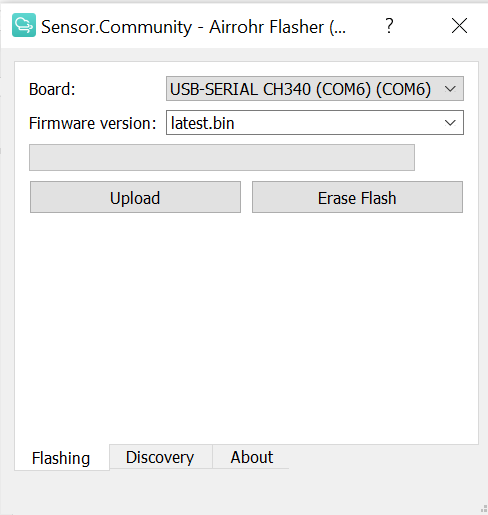
- choose latest.bin for firmware version
- press UPLOAD
- check upload progress in the progress bar
- write down the sensor UID
- disconnect and reconnect esp8266
- check for the airRohr network in your WIFI settings
- from there you know the drill…
---
### Author:  [@pjg](https://forum.sensor.community/u/pjg)
#### Post date: [January 31, 2022, 9:42am UTC](https://forum.sensor.community/t/configure-the-station-with-wifi-network-farylink/1205/6 "2022-01-31T09:42:23Z")
Indeed your are not using the flasher…
Follow exactly the instructions in the last message here