# Changing location of a sensor on devices.sensor.community/sensors
**URL:** https://forum.sensor.community/t/changing-location-of-a-sensor-on-devices-sensor-community-sensors/1185
**Category:** Uncategorized
**Created:** [January 22, 2022, 8:11pm UTC](https://forum.sensor.community/t/changing-location-of-a-sensor-on-devices-sensor-community-sensors/1185 "2022-01-22T20:11:49Z")
**Posts on this page:** 14
**Page:** 1
### Author:  [@Nino](https://forum.sensor.community/u/Nino)
#### Post date: [January 22, 2022, 8:11pm UTC](https://forum.sensor.community/t/changing-location-of-a-sensor-on-devices-sensor-community-sensors/1185/1 "2022-01-22T20:11:49Z")
A colleague of mine wanted to transfer a sensor to another location by first removing or de-registering the sensor from the site, and then re-registering it to the new location. In re-registering the sensor, he gets the message “this sensor ID is already registered”. How can we solve this? In hindsight he should probably have used the “hand over sensor” function, but it is too late for that. Any ideas? Thank you!
---
### Author:  [@deewavo](https://forum.sensor.community/u/deewavo)
#### Post date: [January 23, 2022, 2:39am UTC](https://forum.sensor.community/t/changing-location-of-a-sensor-on-devices-sensor-community-sensors/1185/2 "2022-01-23T02:39:00Z")
send mail to rjako. he can try to help. i tried several times to move from a previous owner ( i had sent them to the govt for review ) and we could de-register. So i bought three nodeMCU and started from scratch.
my sensor list is a mess, i have been through about 30 airRohr and many just won’t go away.
ask Rikki.
and yeah, hand over is easier.
---
### Author:  [@pjg](https://forum.sensor.community/u/pjg)
#### Post date: [January 23, 2022, 7:00am UTC](https://forum.sensor.community/t/changing-location-of-a-sensor-on-devices-sensor-community-sensors/1185/3 "2022-01-23T07:00:21Z")
Mail: tech@sensor.community
You don t have to remove the sensor.
Just change the address and the geocoordinates in devices.sensor.community.
---
### Author:  [@Nino](https://forum.sensor.community/u/Nino)
#### Post date: [January 25, 2022, 8:43pm UTC](https://forum.sensor.community/t/changing-location-of-a-sensor-on-devices-sensor-community-sensors/1185/4 "2022-01-25T20:43:43Z")
thanks, pjg, for your reply. I understand now that it is a matter of just changing the address etc., but the damage is already done, the sensor has been removed! …and now I cannot add it as a new device.
---
### Author:  [@pjg](https://forum.sensor.community/u/pjg)
#### Post date: [January 25, 2022, 10:30pm UTC](https://forum.sensor.community/t/changing-location-of-a-sensor-on-devices-sensor-community-sensors/1185/5 "2022-01-25T22:30:38Z")
Just write to Rajko at tech@sensor.community.
Tell hin the Board ID and the e-mail if the account at devices… He should be able to make the Sensor come back.
---
### Author:  [@thatent](https://forum.sensor.community/u/thatent)
#### Post date: [June 25, 2023, 11:03am UTC](https://forum.sensor.community/t/changing-location-of-a-sensor-on-devices-sensor-community-sensors/1185/7 "2023-06-25T11:03:33Z")
Quick question as a follow-up to this. If I update the address of a sensor, what happens to the historical data? Is that transferred, and if so, is that avoidable?
For example, if I’m moving my sensor to a different city / country.
---
### Author:  [@pjg](https://forum.sensor.community/u/pjg)
#### Post date: [June 26, 2023, 4:27am UTC](https://forum.sensor.community/t/changing-location-of-a-sensor-on-devices-sensor-community-sensors/1185/8 "2023-06-26T04:27:17Z")
The coordinates are updated in the archive from the date of the change,.
---
### Author:  [@webmarwell](https://forum.sensor.community/u/webmarwell)
#### Post date: [June 4, 2024, 1:41pm UTC](https://forum.sensor.community/t/changing-location-of-a-sensor-on-devices-sensor-community-sensors/1185/9 "2024-06-04T13:41:56Z")
I was searching for information how to change a sensors location just in case of moving it to another location and found this topic. Could you confirm if I understand the process right?
If I move a sensor to another location I have to change the coordinates on the first day of uploading data from the new location. It is changed at devices.sensor.community in the settings section of the specific sensor. No way to change it in advance or after, right?
The historical data stays with the old coordinates, the future data with the new ones, right?
The info “Short description of location” isn’t stored in the data, is it? If not stored in the data the new info could be added with a comment about the new coordinates like location 1 + info 1, location 2 + info 2, …, right?
Thank you in advance!
---
### Author:  [@Nino](https://forum.sensor.community/u/Nino)
#### Post date: [June 4, 2024, 4:28pm UTC](https://forum.sensor.community/t/changing-location-of-a-sensor-on-devices-sensor-community-sensors/1185/10 "2024-06-04T16:28:29Z")
The process you describe is how I have tackled it in the past, on the day of moving the device. I would also change the details about the position, don’t worry about mentioning the previous details. Good luck!
---
### Author:  [@paspiz](https://forum.sensor.community/u/paspiz)
#### Post date: [September 4, 2026, 12:11pm UTC](https://forum.sensor.community/t/changing-location-of-a-sensor-on-devices-sensor-community-sensors/1185/11 "2026-09-04T12:11:04Z")
Hello everyone. I changed the position of my sensor and so I want to change it also in the map. How do I do that? I read specific topic, but I could not undestand where I have to to modify this information.
Pasquale
---
### Author:  [@ricki-z](https://forum.sensor.community/u/ricki-z)
#### Post date: [September 6, 2026, 8:31am UTC](https://forum.sensor.community/t/changing-location-of-a-sensor-on-devices-sensor-community-sensors/1185/12 "2026-09-06T08:31:47Z")
Go to [https://devices.sensor.community/](https://devices.sensor.community/) . Open the “Settings” of your sensor there, change the address information, click on “Lookup address” right above the map, check that the pin is on the right position after that and then save the new settings. It may need some minutes that the changes are shown on the map as the new location is only saved in the data stream beginning with the next received measurement.
---
### Author:  [@paspiz](https://forum.sensor.community/u/paspiz)
#### Post date: [September 6, 2026, 1:15pm UTC](https://forum.sensor.community/t/changing-location-of-a-sensor-on-devices-sensor-community-sensors/1185/13 "2026-09-06T13:15:53Z")
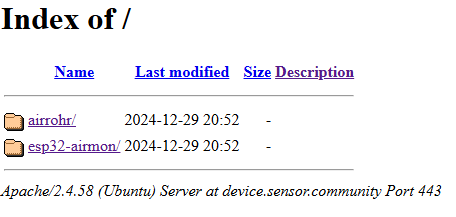
Thanks ricki-z, but I can see only a directory tree there. No setting to open.
Where am I wrong?
---
### Author:  [@Phaze-III](https://forum.sensor.community/u/Phaze-III)
#### Post date: [September 6, 2026, 4:15pm UTC](https://forum.sensor.community/t/changing-location-of-a-sensor-on-devices-sensor-community-sensors/1185/14 "2026-09-06T16:15:34Z")
Please try [https://devices.sensor.community/](https://devices.sensor.community/)
---
### Author:  [@paspiz](https://forum.sensor.community/u/paspiz)
#### Post date: [September 6, 2026, 6:31pm UTC](https://forum.sensor.community/t/changing-location-of-a-sensor-on-devices-sensor-community-sensors/1185/15 "2026-09-06T18:31:30Z")
Ok, now I have changed position. Thanks very much.